Tools
Community-built tools for the ‘Verse.
Star Citizen has a rich ecosystem of fan-made tools. These are the ones worth bookmarking — from fleet visualisers and DPS calculators to trade route planners and live commodity prices. All free, all community-built.
Five tools cover most of what a new player needs. StarJump Fleetviewer compares ship sizes in 3D. Erkul calculates ship loadouts and damage per second. SC Trade Tools plans trade routes. UEX Corp tracks live commodity prices. Once you already own a ship, CCU Game finds the cheapest upgrade path to another using CCUs. Every tool on this page is free, browser-based, and built by the community.
Built by DayOneCitizen
Quick Reference — keybinds & shops on one page
The keybinds that matter and which shop sells what, built for your phone. No tabs to juggle mid-session.
Built by DayOneCitizen
Fact Check — is that Star Citizen claim actually true?
A searchable ledger of claims about the game — wipes, the referral bonus, funding, events — each verified against an official Cloud Imperium source, with the date we last checked. Also answers as the /factcheck command in our Discord.
Already own a ship?
Skip this until you have flown your starter ship for a while. Upgrades cost real money, and nothing here is needed to play. Read our CCU chains guide first.
Plan ship upgrades with CCU Game
A CCU lets you move from one ship to a pricier one by paying only the price difference. Chaining several together can cut a ship's real cost in half. CCU Game is the free calculator we recommend for building those chains. It also manages your hangar — import your RSI account and it shows every ship and upgrade you own, plus anything you can buy back.
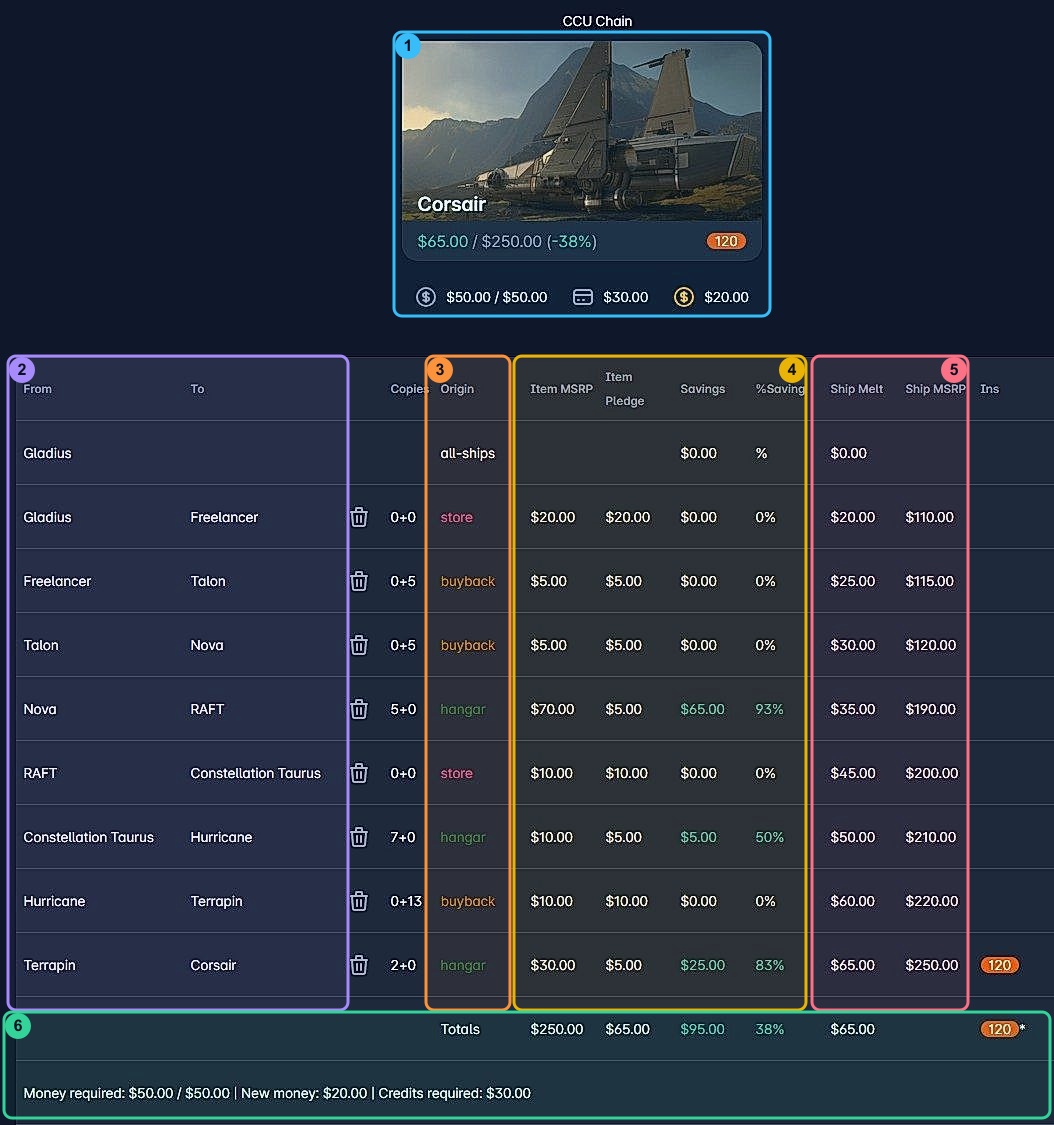
Small text? Click the image to open it full size.
Import your hangar so CCU Game knows what you already own.
Pick a target ship. The cheapest chain is built for you automatically.
Buy the discounted steps during sales. They never expire.
Apply the chain in order on the RSI website. Each step is permanent.
Ships & Combat
Erkul DPS Calculator
Pick any ship, configure your loadout, and instantly see the effect on damage per second, shield regen, power draw, and quantum range. Essential for optimising combat builds before spending aUEC on components.
Open tool →
Spviewer
Exhaustive ship performance data in one place — speed, agility, shield HP, cargo, crew, and more. Compare any two ships side by side to see which fits your playstyle.
Open tool →
CCU Game
Find the cheapest upgrade path between ships using Cross-Chassis Upgrades. Tracks historical ship prices and shows the lowest-cost route to the ship you actually want.
Open tool →
Trading & Economy
SC Trade Tools
The go-to trade route planner. Enter your ship's cargo capacity and jump range, and it finds the most profitable commodity runs in the current patch.
Open tool →
UEX Corp
Live commodity prices, market data, and trading plans sourced directly from in-game terminals. Also covers mining commodity values and refinery calculations.
Open tool →
Exploration & Mining
Regolith Rocks
Mining calculators, group coordination tools, and survey data for prospectors. Helps you plan ore runs, estimate yields, and track refinery jobs across multiple sessions.
Open tool →
Cornerstone Item Finder
Can't find a specific helmet, weapon, or ship component in-game? Cornerstone shows every shop that stocks it, with current prices. Saves hours of running between vendors.
Open tool →
Verseguide
An interactive guide to every location in the game — planets, moons, stations, outposts, derelicts. Great for planning an exploration run or just orienting yourself in the 'Verse.
Open tool →
Reference
Star Citizen Wiki
The community encyclopedia. Ships, equipment, locations, lore, patch history, and mechanics — all documented in detail. If you need to look something up, start here.
Open tool →
RSI Roadmap
The official development progress tracker from Cloud Imperium. Shows what's in active development, what's in the release view for the current patch, and what's coming next.
Open tool →
Essential Tool
StarJump Fleetviewer
The definitive Star Citizen fleet visualizer. Build your fleet, compare ship sizes side by side in stunning 3D, and share your loadout with other players. Uses high-resolution pre-rendered assets to show every flyable and concept ship in the game. Best-in-class for understanding the true scale of ships before you pledge.
Open StarJump Fleetviewer →
Common questions
What are the best Star Citizen tools?
Five cover most needs: StarJump Fleetviewer for ship sizes, Erkul for loadouts, SC Trade Tools for trade routes, UEX Corp for commodity prices, and CCU Game for upgrade paths. All free, all browser-based.
What is Erkul?
A free ship loadout calculator at erkul.games. Pick a ship, configure weapons and components, and see damage per second, shield regeneration, power draw, and quantum range before you spend in-game currency on parts.
What is the best fleet viewer?
StarJump Fleetviewer at hangar.link. It renders every flyable and concept ship in 3D so you can compare sizes side by side and share your fleet with other players.
Are these tools free?
Yes — every tool here is free and community-built. None are affiliated with Cloud Imperium Games, and accuracy depends on volunteer maintainers keeping pace with game updates.