Your first day in the ‘Verse
You wake up in your hab. You walk outside. You see other players. You briefly panic. Here is a calm, ordered list of the first ten things to do — and what to ignore until later.
Wake up and get oriented
You spawn in your hab — a small personal apartment. Look around. Notice the bed (you will need it to log out safely), the storage terminal on the wall, and the door.
Press F1 to open your mobiGlas. Check your wallet — your 50,000 UEC referral bonus should be there. Note your starting city. Close mobiGlas and head to the door.
Get to the spaceport
Each city has its own route from the hab district to the spaceport. The full routes for all four major cities are in Section 11: Getting from your hab to the hangar.
The quick version: take the elevator out of the hab tower, follow transit signage to the spaceport, and look for the hangar district once there. Hold F on any kiosk or terminal for the Inner Thought context menu, which often has a “Set Destination” option to put a marker on your HUD.
Find the ASOP terminal and claim your ship
At the spaceport, look for an ASOP terminal — a vertical kiosk with a ship icon. These are typically near the hangar bay entrance, after a security checkpoint. Hold F to interact with it.
Your starter ship will appear in the terminal’s list. Select it and choose Claim. The terminal assigns you a hangar number (e.g., “Hangar 7-A”). Note this number, then walk to that hangar door.
If the terminal shows “Reclaim” instead of “Claim,” the ship is still spawning. Wait 30–60 seconds and try again.
Board your ship
Walk to your assigned hangar. The door opens automatically when you approach. Your ship is inside. Walk up to the entry point — a door ramp, a ladder, or an access hatch depending on the ship.
Hold F at the entry point. Select Enter Seat or the equivalent option. You are now in the cockpit.
Take a moment. Look around the cockpit. MFDs (multi-function displays) line the sides. The central display shows your speed. You are about to fly a spaceship.
Power on and take off
Your ship is unpowered. Press Right Alt + R to make it flight ready and request power from the ship’s systems. You will hear engines spooling, systems coming online. Wait for the HUD to populate.
Toggle landing gear up with N. Apply gentle upward thrust with Space to lift off. Move the mouse to steer. Exit the hangar slowly — the hangar door and walls will damage your ship if you clip them.
Once clear of the hangar, you are in open air or space. The full take-off sequence is covered in Section 12: Your first flight.
Accept a delivery mission
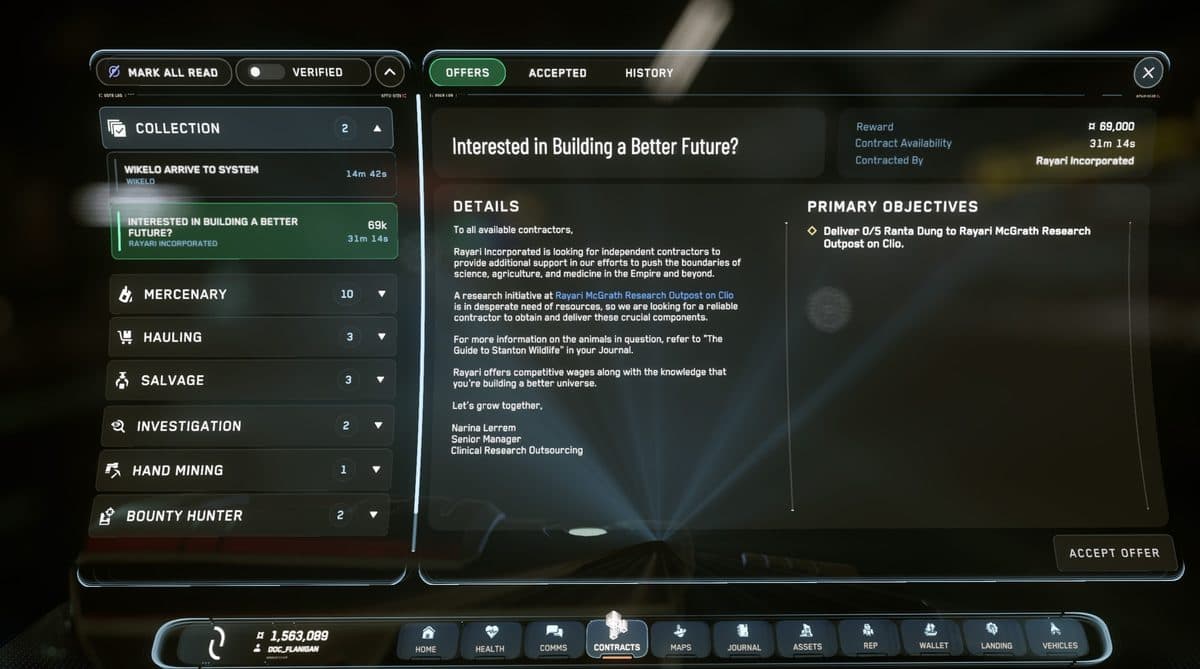
Open mobiGlas (F1) and go to the Contracts Manager. You will see a list of available jobs. Look for delivery missions — they show a package icon and describe picking up and dropping off cargo.
Select a delivery mission in the Stanton system — one that picks up from and delivers to locations on the same planet or moon you are near. Accept it. A waypoint appears on your HUD pointing toward the pickup location.
Use quantum travel to reach the destination
If the pickup location is far away — across a moon, at an orbital station, or on another body in the system — you will use quantum travel to get there fast.
Hold B (a long press) to cycle your master mode to NAV, then middle-click to cycle into QT mode with your destination targeted (it appears as a waypoint). Point your nose at it and the quantum drive auto-calibrates — a circular indicator appears in your HUD. When it completes, hold left-click to jump. The ship accelerates dramatically and you are transported across the system in seconds to minutes depending on the distance.
Point your nose at the destination marker before spooling — the quantum drive only jumps in the direction you are already facing.
Pick up the cargo, deliver it, get paid
Land at the pickup location — look for a landing pad (a marked flat surface, often with yellow/white markings). Lower landing gear (N) before touchdown.
Inside the location, find the box or item for your mission. It will be highlighted with a mission marker. Hold F to pick it up. Carry it to your ship’s cargo hold and place it inside.
Fly to the delivery location, land, and carry the box to the marked dropoff point. The mission completes automatically and aUEC lands in your wallet.
Explore and build a routine
After your first mission, you have a sense of the loop. Spend the rest of your first session exploring:
- Visit a space station — fly to the nearest orbital station. They have shops, medical bays, and terminals.
- Walk around a city — step out of the spaceport and explore the city district. Star Citizen’s cities are enormous and genuinely interesting to walk through.
- Run a second mission — now you know the loop, it goes faster.
- Visit a shop — use some aUEC to buy armor or a weapon from a city retailer. Equip it from your inventory (I).
Log out safely
When you are done, do not just close the game. Return to your ship or any location with a bed. Hold F on the bed and select Bed Log. This performs a bedlog — a clean save that preserves your character’s exact location and state.
If you cannot reach a bed, use the Escape menu → log out. This performs a standard logout and respawns you at your set home location next session.
What to ignore on day one
Star Citizen has a lot. Not all of it is for day one. Deliberately put off:
- Mining — requires a mining-capable ship (Prospector, MOLE) or a handheld mining laser. You do not have either yet.
- Salvage — requires a salvage ship. Same situation.
- Combat bounties — learn to fly well first. Combat bounties against human PvP targets will punish a new pilot.
- Pirate zones like GrimHEX — fun eventually, unnecessary friction on day one when you are learning the basics.
- Joining an Org — there is time for this. Get your bearings first.
Common questions
What should you do first on day one?
Wake up in your hab, open your mobiGlas with F1, and check your wallet. Then get to the spaceport, claim your starter ship at an ASOP terminal, and board it in your assigned hangar.
How do you claim your ship?
At the spaceport, find an ASOP terminal — a vertical kiosk with a ship icon near the hangar bay entrance. Hold F to interact, select your starter ship, and choose Claim. The terminal assigns you a hangar number.
What is a good first mission for a new player?
A delivery mission. Open the Contracts Manager in your mobiGlas and pick a delivery that collects from and delivers to locations on the same planet or moon. A waypoint appears on your HUD pointing toward the pickup location.