Key binds you need to know
Star Citizen has hundreds of keybinds. You only need about fifteen on your first day. Here they are — on foot, in a ship, and a few that every player should know immediately.
Six keybinds matter most on day one. Press F to interact, F1 to open mobiGlas, and I to open your inventory. In a ship, Right Alt + R makes you flight ready, N toggles landing gear, and a long press of B cycles your Master Mode. NAV is the mode you use for quantum travel. The full tables below cover the rest.
On-foot controls
| Key | Action |
|---|---|
| F | Interact — tap to use doors, terminals, ship entry points, items on the ground, NPCs. Hold on an object for extended options. |
| F1 | Open / close mobiGlas |
| I | Open inventory |
| Left Shift | Sprint (hold while moving) |
| C | Crouch (hold) |
| Left Ctrl | Prone (tap) |
| Space | Jump |
| R (hold) | Holster your weapon. A quick tap of R reloads instead. |
| R | Reload (tap) |
Ship flight controls
Star Citizen uses a mouse + keyboard control scheme by default. Mouse controls aim direction; keyboard controls throttle, strafe, and roll.
| Key | Action |
|---|---|
| W / S | Increase / decrease throttle |
| A / D | Strafe left / right |
| Q / E | Roll left / right |
| Space | Strafe up (vertical thrust) |
| Left Ctrl | Strafe down |
| Left Shift | Afterburner (boost) |
| Y | Exit your seat |
| Left Shift + U | Emergency exit from your seat |
| N | Toggle landing gear |
| Right Alt + R | Flight ready — powers your ship's systems on / off. Plain R cycles your sub-target instead. |
| B | Hold B (long press) to cycle your Master Mode. NAV is the mode you use for quantum travel (middle-click for QT mode, aim at a destination, drive auto-calibrates, hold left-click to jump) |
| L | Toggle ship lights |
| T | Cycle targets in view |
| Tab | Radar ping (hold, then release) |
| F1 | Open mobiGlas (works in-cockpit too) |
Capacitor management
Your ship has three capacitors that regenerate over time. You control how fast each one refills by shifting regen toward whichever system you need most:
- Weapons — faster recharge for energy weapons
- Engines — faster refill for the thruster boost capacitor
- Shields — faster shield regeneration
Shift regen between the three with the F-key row:
- F5 — push regen toward weapons
- F6 — push regen toward engines
- F7 — push regen toward shields
- F8 — reset to balanced (equal regen across all three)
In a fight, push to shields to recover faster from hits. Trying to escape? Push to engines so your thruster boost refills quickly. On a routine delivery run, balanced across all three is fine.
The MFD (multi-function display) in your cockpit shows the current capacitor distribution. Glance at it to see where your regen is sitting.
Finding and customizing keybinds
Star Citizen’s full keybind list is enormous — covering every possible interaction in the game. To access it:
- Press Escape to open the main menu
- Select Key Bindings
- Browse categories: On Foot, Flight, Mining, etc.
Want every default binding on one page? Our sister site keeps the full Star Citizen keybind list, grouped by activity.
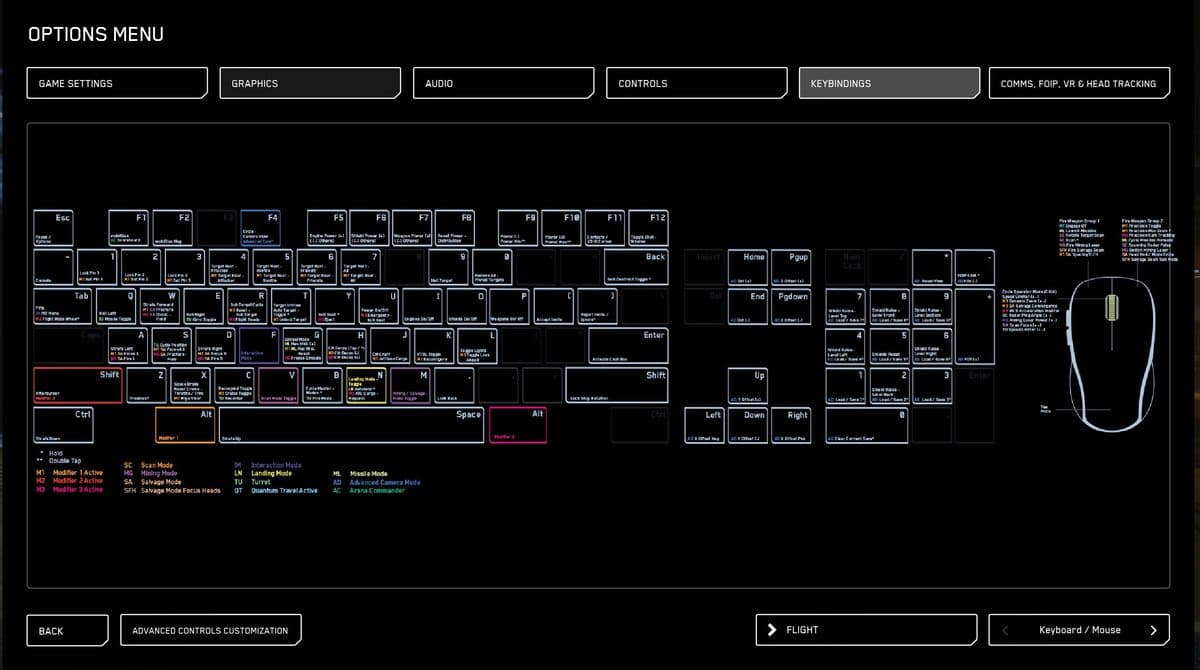
You can change any binding by clicking it and pressing the new key combination. Before making extensive changes, use the Export function to save your current bindings as a profile. This lets you restore the defaults if something goes wrong.
HOTAS and controller users: Star Citizen has native support for joysticks and flight sticks. The keybind menu has a separate section for joystick axes and buttons. Many dedicated sim pilots use a full HOTAS setup. For day one, keyboard and mouse is the most reliable way to learn the controls.
Common questions
What are the most important keybinds in Star Citizen?
Six on day one: F to interact, F1 for mobiGlas, I for inventory, Right Alt + R for flight ready, N for landing gear, and a long press of B to cycle your master mode. NAV mode is the one you use for quantum travel. Everything else can wait until you need it.
How do you change keybinds?
Press Escape, select Key Bindings, click any binding, and press the new keys. Export your bindings first so you can restore the defaults if something goes wrong.
Does Star Citizen support a joystick or HOTAS?
Yes — native support, with a separate keybind section for joystick axes and buttons. For day one, keyboard and mouse is the most reliable way to learn.
How do you turn your ship engines on?
Sit in the pilot seat and press Right Alt + R. That combo — flight ready — powers the ship and its engines. Press N to raise the landing gear once you are airborne.
Sources
Where these facts come from
Every factual claim on this page is checked against official Cloud Imperium Games sources. Dates and figures are verified against the primary RSI blog post or support article linked below — not third-party trackers.
In Star Citizen's default keyboard bindings, Flight / Systems Ready is Right Alt + R (not R). Plain R reloads on foot and cycles the sub-target in a ship. U toggles power to all ship systems.
By default in Star Citizen, F is the interaction key, F1 opens the mobiGlas, N raises and lowers landing gear, and B (in the pilot seat) switches the ship's Master Mode to NAV for quantum travel.
Star Citizen's controls are fully rebindable in-game through the Options / Keybindings menu, with native support for joysticks, HOTAS, and other peripherals; custom binding profiles can be exported and imported.
In current Star Citizen (Alpha 4.10), quantum travel works by pressing B once to switch Master Mode to NAV, middle-clicking to cycle Operating Mode to QT, setting a route (Starmap or a destination marker), letting the quantum drive auto-calibrate (no hold required), then left-clicking to begin the jump, which ends automatically at the destination (planetside arrivals land about 30 km above/near the surface location).