How to actually buy the game
Star Citizen is sold exclusively on robertsspaceindustries.com — not Steam, not Epic, not anywhere else. Here is the exact process, including the one step most new players miss that costs them 50,000 free credits.
STAR-GCQJ-N6NC — it gives you 50,000 free UEC.Step 1 — Create your RSI account
Go to robertsspaceindustries.com and click Enlist Now in the top navigation, or Create Account on any game page.
You will fill in:
- Email address — use a real one. Your account is permanent, game purchase receipts go here, and future security communications use this address.
- Password — use a unique password. Consider enabling two-factor authentication after setup.
- Handle (username) — this is your visible identity on Spectrum and in community spaces. It also becomes your in-game pilot name by default, so choose something you are happy with. Changing it later is possible but not instant. RSI labels this box Account Name. Do not type the referral code here — it has its own field.
- Referral code field — enter
STAR-GCQJ-N6NChere. This is the only reliable window.
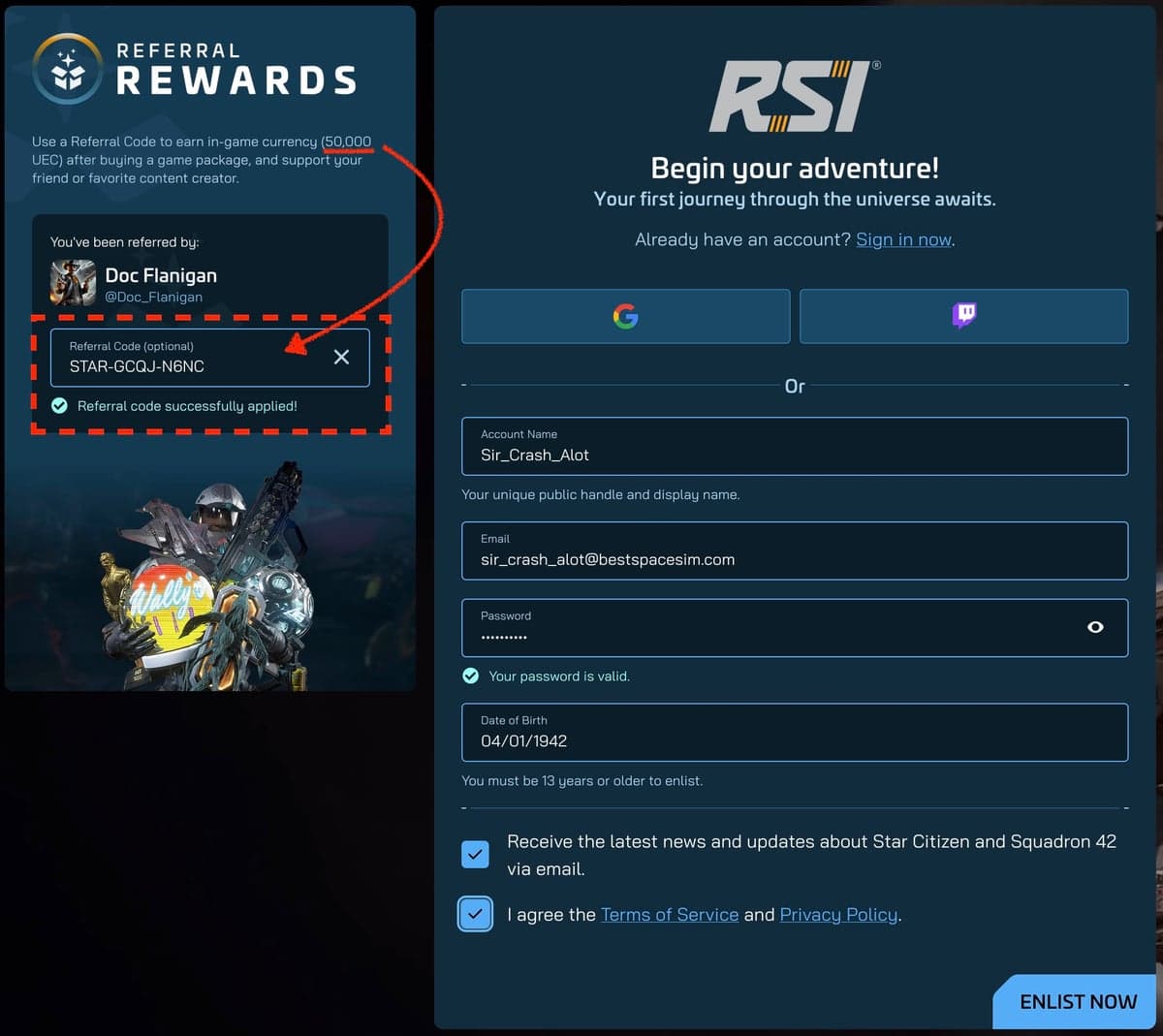
Verify your email when the confirmation message arrives. Your account is not active until this step is complete.
When you create your account, use a referral code to get 50,000 UEC free. Our referral code page has the code and step-by-step instructions.
Step 2 — Navigate to the store
Once logged in, go to robertsspaceindustries.com/store or hover over Buy Star Citizen in the top nav. You are looking for Game Packages — these are the starter options that include Star Citizen alpha access and a starter ship.
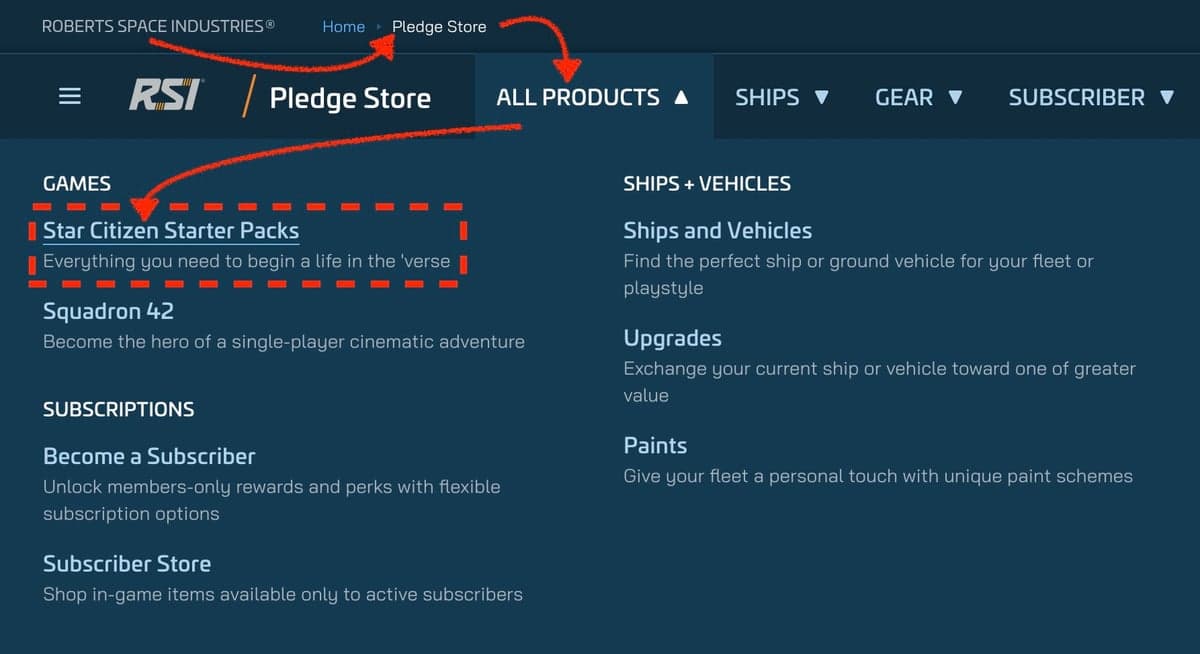
Do not buy a standalone ship from the pledge store on day one. Standalone ships do not include game access — they are add-ons for players who already own the base game. You need a game package first.
And do not go looking for it on Steam — the game is not sold there, or on any console. The full platform rundown is in Is Star Citizen on Steam?
Step 3 — Choose your package
The cheapest game packages start at $45 on sale ($60 list) and include:
- Access to the Star Citizen alpha (the live Persistent Universe)
- A starter ship with standard insurance
- 10,000 starting UEC
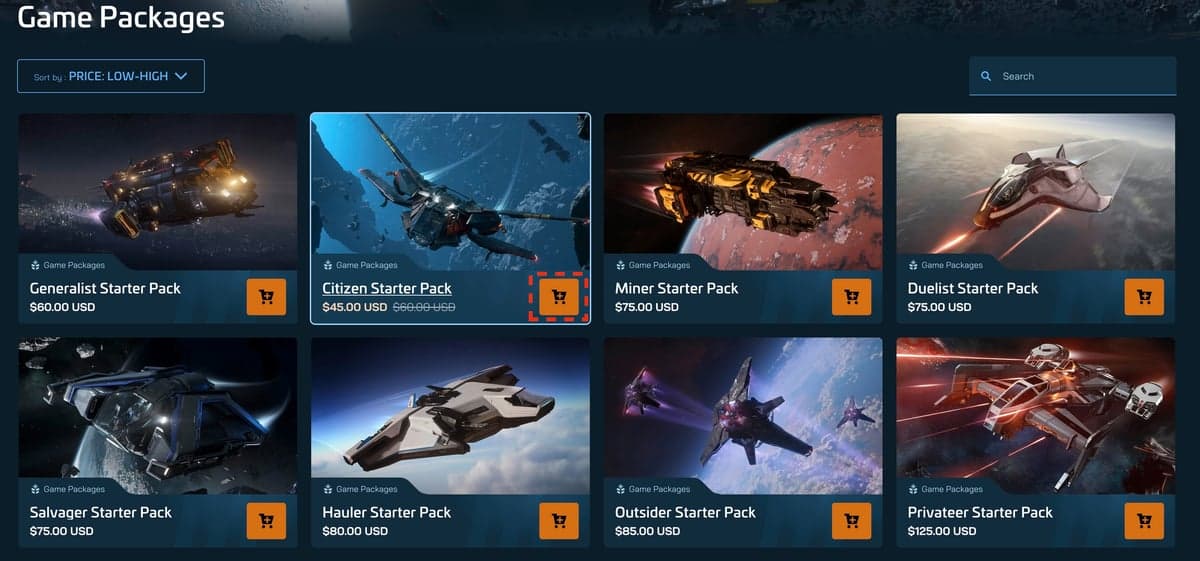
The Citizen Starter Pack comes with the Aurora Mk II. Its long-running alternate, the Mustang Alpha, now appears mainly in older and occasional promotional packages. A full comparison of all the packages is in Section 05: Which starter package should you buy?
The short version: the Aurora Mk II is the more practical choice for a new player. It carries cargo, which opens delivery missions immediately. The Mustang Alpha is faster and more fun to fly, but carries almost nothing. The first-ship guide walks through that choice honestly.
Step 4 — Checkout
Add the package to your cart and proceed to checkout. RSI accepts major credit and debit cards, PayPal, and some regional payment methods. The checkout is standard — billing address, payment details, order confirmation.
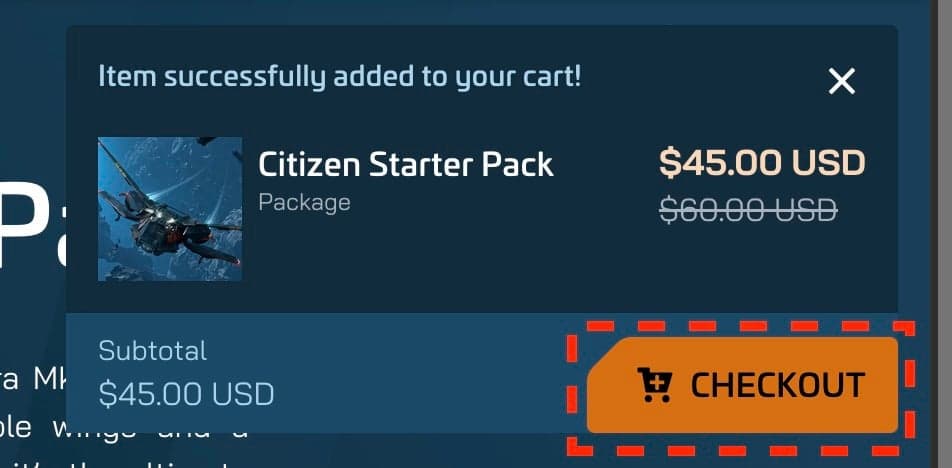
After payment you will receive a confirmation email. Your account will be upgraded immediately — no need to wait for any physical item (there is none). Your ship is in your in-game hangar from the moment the purchase clears.
Step 5 — Download the launcher
After purchase, log into your RSI account and go to your Library. You will see Star Citizen listed. Click Download to get the RSI Launcher installer — a small executable file (around 20 MB).

Run the installer to install the RSI Launcher on your PC. The Launcher then downloads the actual game — this is where the 100 GB+ comes from. Start this process well before you want to play. On a typical home connection, the full download can take several hours.
Everything about the launcher — which version to use, how to verify files, and what PTU means — is covered in Section 07: Using the RSI Launcher.
After you buy: the referral bonus timeline
If you entered a referral code at sign-up, your 50,000 UEC bonus is credited to your account. This appears in your wallet in-game as a starting balance. It does not expire — and because it is account UEC rather than earned aUEC, a wipe never touches it. Your pledged ships and items are never wiped either. The full survives-vs-resets breakdown is in when is the next wipe?
50,000 UEC on day one buys you starter armor sets, weapons, and consumables at shops around the Persistent Universe — enough to gear up without grinding for your first few sessions.
Common questions
Where do you buy Star Citizen?
Only on robertsspaceindustries.com — not Steam, not Epic. You buy a game package, then download the RSI Launcher from your account library.
How much does it cost?
The cheapest game packages start at $45 on sale ($60 list). That includes alpha access, a starter ship with insurance — the Citizen Starter Pack comes with the Aurora Mk II — and 10,000 starting UEC.
Can you start with just a ship?
No. Standalone ships do not include game access. You need a game package first — ships are add-ons for people who already own the game.
Already enlisted? Join the DayOneCitizen Discord for starter help and ship advice.
Sources
Where these facts come from
Every factual claim on this page is checked against official Cloud Imperium Games sources. Dates and figures are verified against the primary RSI blog post or support article linked below — not third-party trackers.
The Citizen Starter Pack includes 10,000 UEC (account currency) and six months of hull insurance on the Aurora Mk II — not Lifetime Insurance.
New RSI accounts created with a referral code receive a 50,000 UEC enlistment bonus.
Star Citizen is available only for Windows PC through the RSI Launcher, purchased directly from robertsspaceindustries.com — it is not sold on Steam, Epic, or GOG, and does not run on PlayStation, Xbox, or Game Pass (as of July 2026).