Creating and Managing Parties in Star Citizen (2026)
How to invite friends into a group, get everyone into the same server, share missions, and crew a ship together.
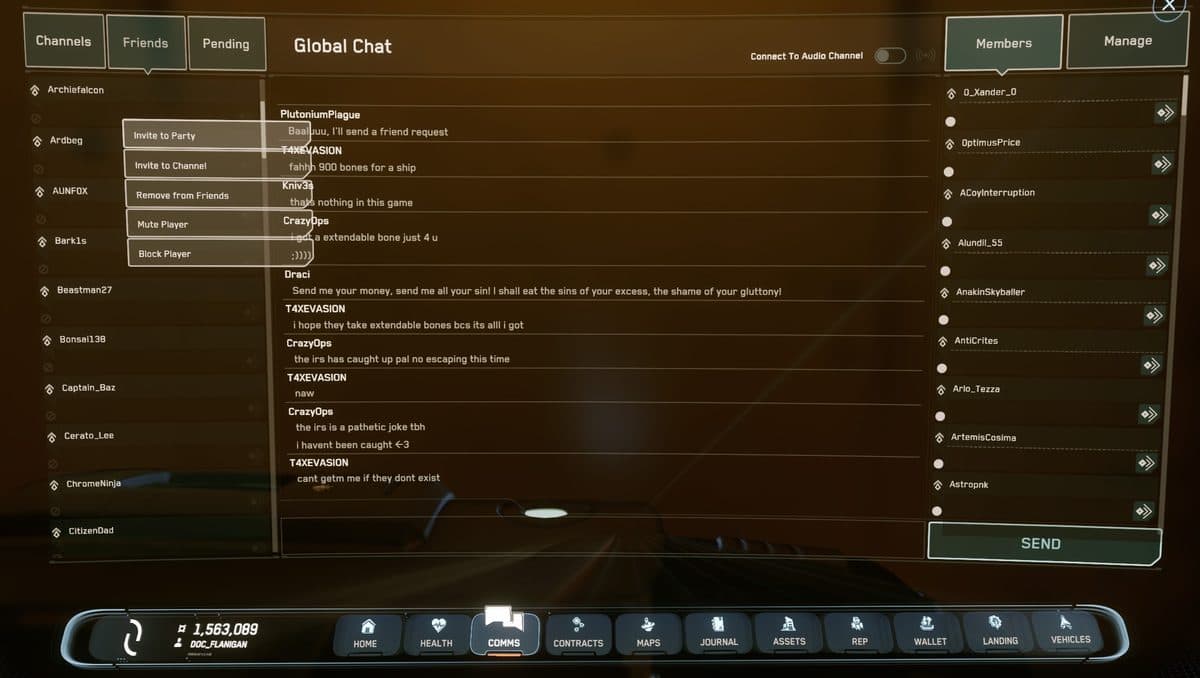
To form a party in Star Citizen, press F11, open the Friends tab, right-click your friend's name, and choose Invite to Party. Once everyone accepts, the party leader clicks Enter Universe from the main menu and the whole group lands on the same server together.
Before you can invite someone to a party, you need to be friends in the game. If you have not added them yet, see the Adding Friends guide first. Once you are friends, forming a party takes about thirty seconds.
What a party actually does
- Shows party members as friendly markers on your HUD — you can see where your friends are at a glance.
- Routes everyone to the same server shard when you enter the universe from the main menu together.
- Enables quantum linking — the pilot starts a quantum jump and nearby party members can join the jump and travel together.
- Shares mission objectives so everyone sees the same waypoints.
- Opens a dedicated party chat channel in the Commlink.
Method 1 — Invite from the Friends list (F11)
This is the fastest way if you are already in the game.
- Press F11 to open the Commlink.
- Click the Friends (Contacts) tab.
- Right-click your friend's name.
- Select Invite to Party.
- They will see the invite in their Commlink. Once they accept, you are in a party together.
Method 2 — Invite via mobiGlas Contacts
- Press F1 to open the mobiGlas.
- Open the Contacts Manager app.
- Find the player and click Invite to Party.
Getting onto the same server
Star Citizen runs multiple server shards — separate copies of the universe running at the same time. Being in a party does not automatically put you on the same one unless you follow the right process.
The reliable method
Form your party while everyone is at the main menu — before anyone clicks Enter Universe. The party leader enters, and the rest follow. The game routes everyone to the same shard automatically.
- Already in-game and on different shards? Leave to the main menu, accept the party invite, then re-enter. You will land on the party leader's shard.
- Still on different shards after that? Both players leave to the main menu. Disband and re-form the party, then enter together again.
Party leader responsibilities
The party leader is automatically the player who created the party.
- Controls quantum linking for the group — initiates jumps for everyone.
- Can share missions so all members see the same objectives.
- Can transfer leadership to another member via the party screen.
- Can remove members if needed.
Crewing a ship together
By default, only the ship owner can operate its critical systems. To let party members take control of turrets, co-pilot seats, or engineering stations, open the vehicle management screen from your mobiGlas and set access permissions to Friends or Party.
Quantum linking explained
Quantum travel is the way ships cross long distances quickly — a faster-than-light mode that takes a few seconds to spool up. Quantum linking lets your entire party make that jump at the same time, so nobody arrives at a destination alone.
When the party leader initiates a quantum jump, other members aboard the same ship or flying nearby in their own ships will see a prompt to engage quantum link. Accept it, and when the leader jumps, everyone linked jumps simultaneously to the same destination.
Common questions
We are in a party but on different servers — how do we fix it?
Both players return to the main menu. Confirm the party is still active. The leader clicks Enter Universe, then the other player follows. If it fails again, disband and re-form the party before entering.
How many players can be in a party?
The cap has changed across updates. For practical group play, two to eight players works best. Very large parties of ten or more can occasionally have trouble being routed to the same shard.
How does quantum linking work?
The party leader initiates a quantum jump. Members who are aboard the same ship or flying nearby will see a prompt to lock onto quantum link. When the leader jumps, all linked members jump together to the same destination at the same time.
Not signed up yet? Use a referral code when you create your account and start with fifty thousand bonus credits.
Get your 50K UEC bonus